The NoTension app · iOS
Your next chapter starts with one small step.
Turn a goal into something you can do. See yourself doing it in a personal AI video. Try it, learn, and take the next step.
Free to download · In-app purchases · iPhone


Sound familiar?
You know what you want to change.
But where do you start?
A big goal. A busy day. Another tomorrow.
What if it felt simpler?
One clear step.
Something you can picture doing.
No perfect plan required. Start small and learn as you go.
Mental Rehearsal Example
A big goal. A real-life moment.
Let’s follow one example: feeling healthier, one evening walk at a time.


Small enough to do this evening. Real enough to matter.
How it works.
Small experiments. Your next chapter.
A simple process inspired by design thinking — picture a step, try it, and learn.
- 01
Choose what matters
Health, work, relationships, or something just for you.
“I want to feel healthier.”
- 02
Make it concrete
When? Where? What will you do? What might get in the way?
“After work. Outside. A 10-minute walk.”
- 03
See yourself doing it
Create a personal AI video in NoTension. Watch it to rehearse your step.
“I put on my shoes and head out.”
- 04
Try it in real life
Put the phone down and give it a go. The action is the point.
“Tonight, I take the walk.”
- 05
Notice what happened
What felt good? What was difficult? Be curious, not critical.
“I enjoyed it. But I was tired.”
- 06
Make the next step easier
Change the time, make it smaller, or try another approach. Rehearse again.
“Tomorrow, I’ll try five minutes.”
The app creates your video. Trying, reflecting and adjusting happen in your everyday life — these are suggestions, not additional app screens.
Inside the real app
Make your rehearsal in NoTension.
Describe tomorrow’s moment in your own words, and the app makes a short personal video of you living it — your face, your voice.
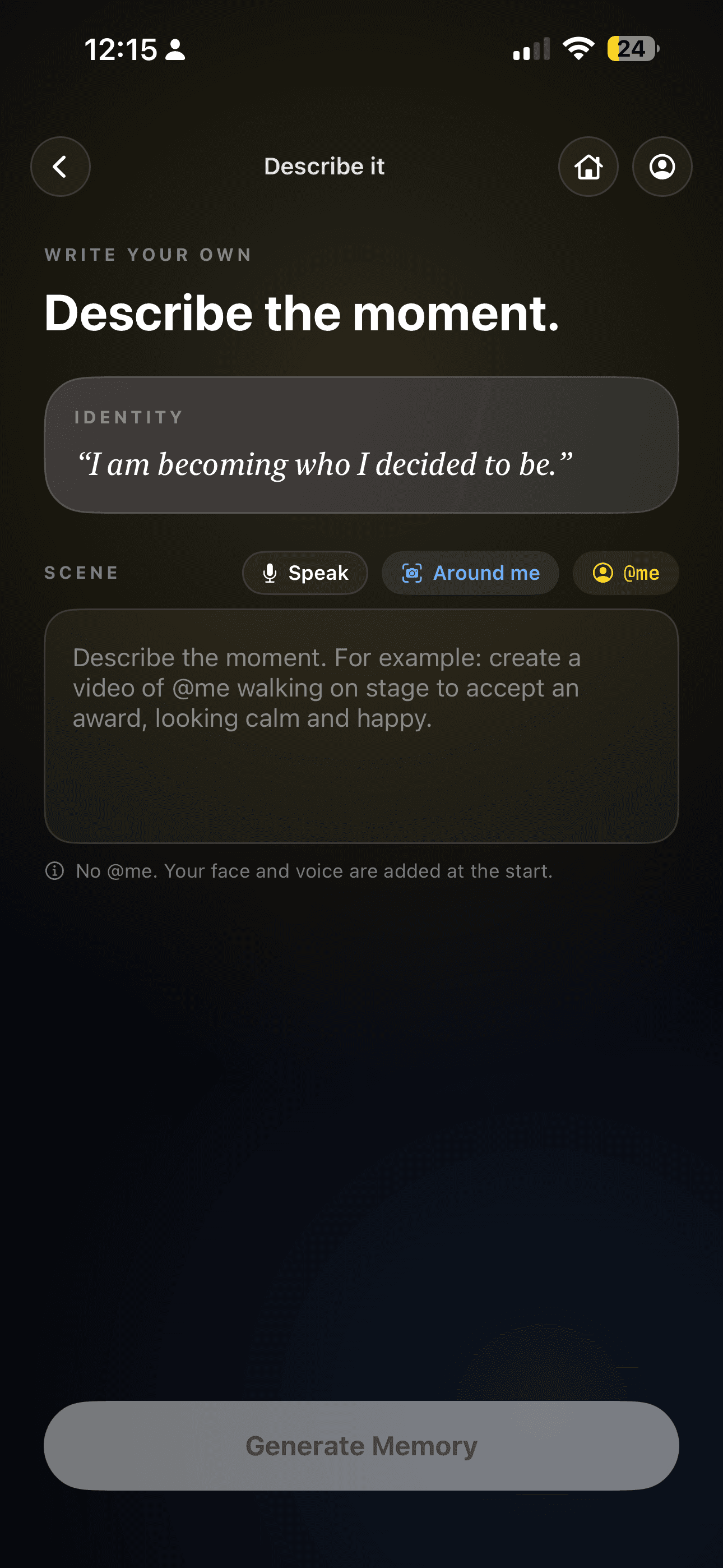

 Illustrative example
1Make it personal
Capture three face angles once. Add two short voice samples if you’d like.
2Describe your moment
The walk, the meeting, the first calm sentence — in your own words.
 Illustrative example
3Watch and replay
Your moment becomes a personal AI video, saved with your memories.
The video is the beginning.
Life is where you try it.
- 1
Try
After work, put on your shoes and take the walk. It doesn't have to be perfect.
- 2
Reflect
How did it go? What felt good? What got in the way?
- 3
Adjust
Ten minutes felt too much? Try five tomorrow. A busy evening? Choose another time.
No pressure, no promises — just a clearer picture of tomorrow’s step.
Everyday possibilities.
A few of the moments you could rehearse:


In the app, the person is you.
What’s your first step?
Available on iPhone · Free to download · In-app purchases
Curious why rehearsal helps? The thinking behind NoTension →
Is the app free?
Free to download, with optional subscriptions unlocked through Apple's in-app purchase system — Apple shows pricing in your local currency.
Is it really my face and voice?
Yes — a one-time guided capture of three face angles puts you in the memories you create, and you can add two short voice samples if you'd like. Replace or delete them any time; everything is covered by the app's privacy policy.
Is this therapy or a prediction?
No. NoTension is an evidence-informed visualization and rehearsal experience — not therapy, medical care, or a prediction of future events.